Saints Row’s Boss Factory Character Creator Tips, Tricks, and Secrets
The Saints Row Boss Factory, just announced and released during Geoff Keighley’s Summer Game Fest, is a sneak peek at the customization suite the full game will have. The demo lets you play around with the game’s character creator to build your own bosses before the game’s release on August 23, exclusively on the Epic Games Store.
You can get a head (and neck and body) start on your criminal creation, saving it as a preset who you can play as when the game comes out. You can even share your boss with other players, meaning people will be able to view your design in their Boss Factory, tweak it, and save it to use in their own game.
In the full game, a reboot of the Saints Row series with a new setting, gang, and more grounded world, the customization covers a huge range of options. You’ll be able to detail cars, redesign weapons, and decorate your HQ. But for now, you’ll have to settle for crafting a criminal, just like we did when we got early access to the demo. Here’s what we learned.
What you can customize with
Eight base bosses are waiting for you to start morphing their looks, and you can change every aspect from head-to-toe, including their socks.
With a boss selected, you have eight areas to alter, including clothing, body, skin. A few of the options, like the Head Shape, come with presets, but you can also alter those when you delve into the menus. You can change the size and shape of every facial feature. Deepen brows, square off chins, swap out teeth. Doctor Frankenstein would love this.
You can change your body’s build, with the three (unnamed) extremes being slim, thicc, and well-built. There’s a slider that defines your figure further, letting you pack on more muscle or slim down some more. There’s also a wide-range of prosthetics, tattoos, piercings, scars, and make-up to help you rearrange your features.
 Clothing works in layers, and has multiple styles and materials. You can also go nude, with silly modesty options that cover the offending areas. And, yes, there is a Groin Slider. Because of course there is.
What you’ll find in the Boss Factory’s wardrobe
Almost all the clothing options will let you select the style, material, and color. Materials are unlocked in the full game, so the demo currently doesn’t let you change any, but the style and colors are up for grabs.
Choosing the prosthetic arm lets us show off the changes that you can easily make across the whole swathe of clothes. The carbon black forearm, white hand and silvery detailing were quickly swapped out for an orange forearm, deep blue hand (with saturation and upped in a sub-menu), and black detailing. It’s bright and bold, and the perfect detail that will get you noticed by innocent bystanders. Stand out this Fall with an Orange Murder Arm! The same options cover jackets, underwear, socks. Your whole wardrobe can be as garish as you want. 
Saints Row’s character creator face options
Each visage has ten elements, and each of those--ears, mouth, eyes, cheeks, etc.--have sub-menus to adjust your meatspace homepage. These are all found in the Head Menu.
There’s way too much to cover, so we’ll just look at the Eye Menu. They say the window to the soul is the eyes, and you can really make people fear for you with over 31 base shapes, 1 base design, and 17 advanced types. If you ever wanted to wink at someone with a triple-iris eyeball, you can do that. You can recolor the most basic oculus as you would your clothing, and you can tweak depth, height, and size.
The nose has 16 different sliders to mess with. We could write thousands of words on it.
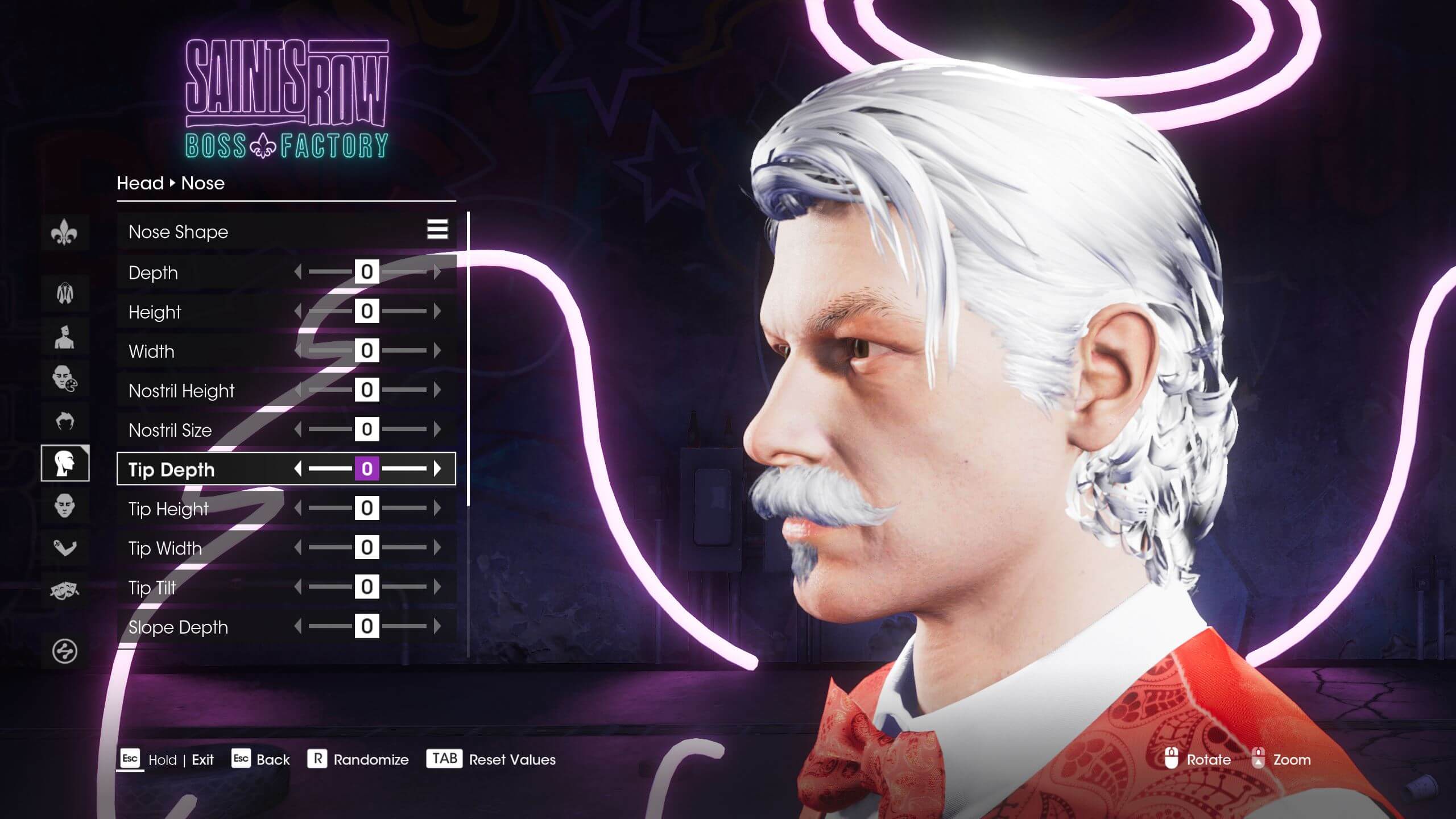 And you can make asymmetric changes via a toggle. Pressing ‘E’ while futzing with a face, lets you make changes on either side of the face. It only works where it makes sense, letting one eye sink into the socket while the other one bulges out. Why? There is no correct answer to that, only further questions.
The hidden secrets in the Boss Factory’s Body Menu
Two cool things about the myriad of body options are contained within the Body and Skin Menus.
The Body Menu lets you define your overall shape, from hunk to lunk, and it’s where the previously mentioned Groin Slider lives. Below that is the Modesty Menu with a plethora of entertaining options. The default is a pixelated box floating over the nipples, but you can replace those with a variety of emoticons. It’s possible to create a human smiley by putting eyes on your chest and a smiling decal below.
In the Skin Menu, you can fiddle with your figure, expanding muscles and adding definition. Or add odd scars (Cat Scratches, Bevels). It’s also where you can take your boss in extreme directions. Skin can be tinted any color you wish, and you can alter RGB, saturation, and brightness. Even better, you can change how glossy your character is. With that in mind, here are a few of our own bosses. With just a few sliders and some tints, you can make some interesting life choices for your Saints Row character.
The Incredible Blulk
This totally original superhero design is a good way to show off how the Tint and Gloss slides can craft a big blue beast.
 To create this unique, one-of-a-kind, never before attempted design, we selected the Quinn Head from the presets. He had the right amount of face meat to work with. We did change a few things: The Blulk here also a Shark Brow, Chiseled Eyes, and Zane Chin from the Head Menu, and Bed Head from the Hair Menu. The Build Slider is set to maximum, and the Figure Slider is set to 0 (surprisingly, the most swole number on the slider). We further enhanced his build with Muscle Definition, and Veins both set to 100 in the Skin Menu. His blue skin is also from the Skin Menu. He’s 15% glossy in the Skin Menu, because of the delta radiation that bombarded him in an extreme tanning session. We gave him 100% Groin size in the Build Menu to compensate for the fact he’s bright blue. He also has Candycorn teeth from the Head Menu, which are terrifying beyond all measure.
Dr. Acula
A few fun details helped craft world-famous Neck Surgeon, Dr. Acula. The orthopedic specialist transferred from Transylvania’s Neck Gnaw Hospital and Blood Bank to live in the bright, sunny Southwestern USA.
 Elf Head is the perfect shape for this. Everything is angled, as all vampires are. We also used the Chin Slider to make a very pointed chin to accommodate the good doctor’s Soul Patch beard from the Hair Menu.
The palest of skin types works well. Mesmer Eyes and Vampire Teeth from the Head Menu bring a swish of the unknown to the doc’s countenance, and the Messy Lipstick from the Face Menu does a great job of standing in for the crimson cocktail the good doctor regularly imbibes.
The Sun Hat and Chic Glasses protect the Doctor from the harsh Santo Ileso sun, and also makes them look hella chic. The Double-Breasted Blazer and Suit, Pants bottoms round off… wait, we just made Dracula, didn’t we?
A man called George
Not every boss looks the part. Some might be short, stocky, and balding, and also happen to be called, oh, let’s say George.
 Now George’s head is, funnily enough, Fighter. It has a nice roundness that fits well with the everyday look. His build should be as thicc as you can make it in the Build Menu, and a 37 on the Figure Slider.
His head is where all the work goes. Start off with the Bald Spot hairdo in the Hair Menu. Dark brown. In the Head Menu, make his mouth thin and drawn via the sliders, and make his chin -100 width and 50 depth. George has a Carson nose at about 75 width, and Diaz eyes that are -100 in size (he’s quite squinty) and -100 in height.
Clothing is a Flannel shirt and Pants, Suit bottoms. Don’t forget the Glasses, Wire Rim to give him that kingpin glare. Congratulations, you have made a George.