Planetary Genesis: Felis
Controller & Input Settings
● Only XInput-compatible controllers are supported for gamepad use. ● Keyboard and mouse controls are supported. ● With the key remapping feature, key bindings (control key/button settings) can be freely customized to your preferred keys or buttons.How To Play
1.The game begins from a view of outer space.
2.Open the Planet Editing UI.
3. Choose the type of planet you want to create. (NoiseType)
4.Experiment with different terrain combinations as well. (NoiseScale, NoiseIntensity, Seed)
5.Once you create a planet you like, move closer and observe it in detail.
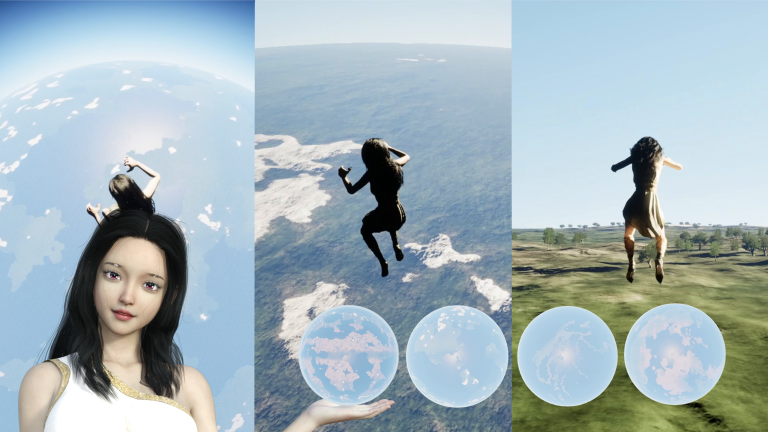
6.Observe planets using two different modes: Planet Mode and Exploration Mode.
7.In Planet Mode, you can orbit around the planet and view it from above.
8.In Exploration Mode, you can freely travel across the planet by flying through the sky or walking along the surface.
9.Observe how the planets you created look both from outer space and from the surface.
10.※ If sudden FPS fluctuations cause the player to teleport inside or outside the planet and make it difficult to continue playing, please use the " Reset Position " button to restore the player's position.
Features
Planet Generation
Choose from 17 different planet types
Modify continent shapes through parameter customization
Advanced parameters allow terrain adjustments for specific planetary regions such as mountains, coastlines, plains, and oceans
Observation Experience
Seamlessly travel from outer space down to the planet surface
Planet Mode” allows you to view the entire planet from orbit
Exploration Mode” lets you freely fly through the sky or walk across the surface
Movement speed in Exploration Mode can be increased for faster travel
Camera distance can be adjusted freely
Toggle character visibility on or off
Toggle cloud visibility on or off
Exploration Support Features
Visualize your exploration location using markers
Marker color and size can be customized
Adjust the sun’s position directly from the UI
If you lose your location, you can quickly recover using the reset button
Options & Configuration
Freely remap controls with customizable key bindings
Supports resolution changes, windowed mode, and fullscreen mode
(Please note that the screen may turn black for about 5 seconds during changes)
Adjust graphics quality settings to improve FPS
Streaming Guidelines
Please refer to the guidelines on the official website for the streaming and gameplay video policy.
https://essence-of-human-game-creation.com/planetary-genesis-felis/streaming-guidelines/ (เปิดในแท็ปใหม่)
Online Manual
Please visit the URL below to view the online manual.
https://essence-of-human-game-creation.com/planetary-genesis-felis/readme/ (เปิดในแท็ปใหม่)
ข้อกำหนดของระบบ Planetary Genesis: Felis
ขั้นต่ำ
แนะนำ
OS version
Windows10 / 11 (64bit)
OS version
Windows 11 (64bit)
CPU
Intel Core i5-8400 / AMD Ryzen 5 2600
CPU
Intel Core i7-9700K / AMD Ryzen 7 3700X
Memory
8 GB RAM
Memory
16 GB RAM
GPU
NVIDIA GeForce GTX 1060 (6GB) / AMD Radeon RX 580
GPU
NVIDIA GeForce RTX 2070 / AMD Radeon RX 5700 XT
DirectX
DirectX 12
DirectX
DirectX 12
Storage
1.1 GB available space (SSD Recommended)
Storage
2.0 GB available space (SSD Recommended)
Additional input device
Gamepad
Additional Notes
Performance targets: Minimum 1080p/Low/30 FPS; Recommended 1080p–1440p/High/60 FPS. Derived from testing on a single reference system (Ryzen 7 3800X, RTX 2070 SUPER, 48GB RAM) with projected scaling to other hardware. Actual performance may vary.
จำเป็นต้องลงชื่อเข้าใช้บัญชี
Epic ID
ภาษาที่รองรับ
เสียง: ไม่ระบุ
ข้อความ: Japanese, English
© 2026 Planetary Genesis: Felis and all related content are owned by UnprecedentedCreations. Unreal® Engine, Copyright 1998 – 2026, Epic Games, Inc. All rights reserved. Music assets by ArnoCyreus (Fab) Planetary Genesis: Felis uses Unreal® Engine. Unreal® is a trademark or registered trademark of Epic Games, Inc. in the United States of America and elsewhere. Unreal® Engine, Copyright 1998 – 2026, Epic Games, Inc. All rights reserved.